
A translation check for SAP transports: find missing texts at release, not at the customer

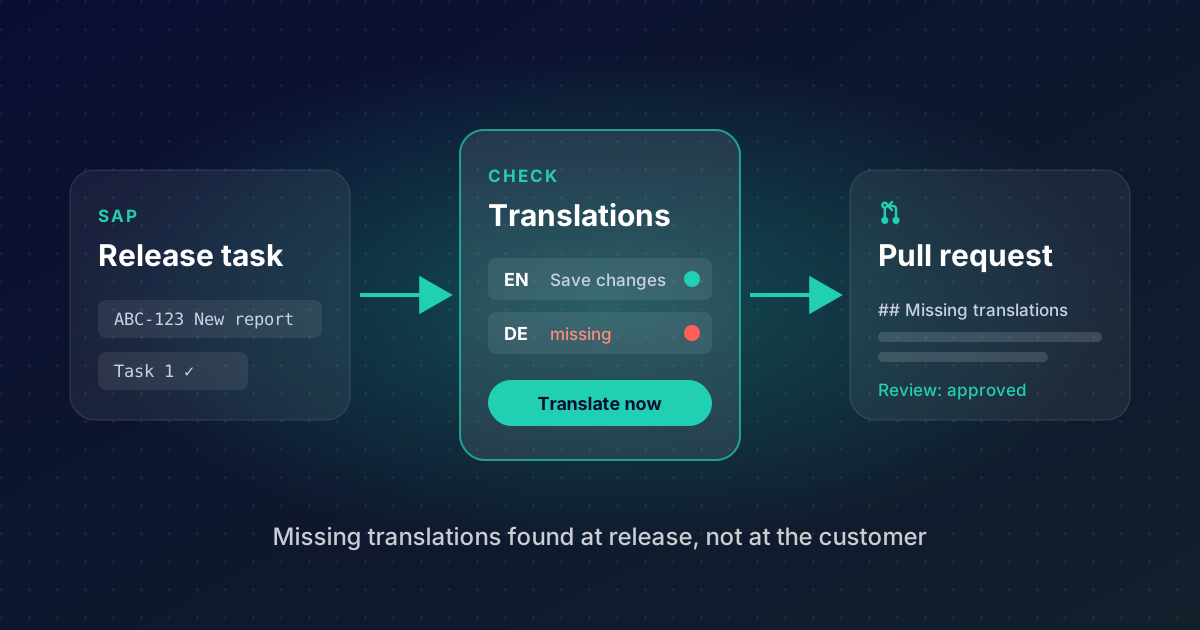
A German customer opens your new report and the selection screen says "Package", "Run in background", "No entries selected". Somebody forgot the translation. SE63 would have told you, if anybody had asked it. And even when the texts were translated on the development system, they are only half done until they reach the next system: a translation that sits in no transport request never leaves.
We added a translation check to abap-transport-review, our open-source tool that connects SAP transport requests with GitHub pull requests (how the review itself works is in Code review for SAP transports, with GitHub pull requests). It answers three questions at the moment a developer releases a task: is every text the user sees translated, is the translation in a request, and does the reviewer see what is still missing?
What it does
- Lists every text without a translation in the languages you require, for a task, a request, packages or a whole namespace.
- Lets you translate right there: type the translations into the list, or download an Excel file, fill it (yourself, a translator or AI) and upload it. Save writes them the way SE63 does and records them in your request.
- Checks at release: in mode
INFORMthe developer sees what is missing and can translate on the spot; in modeBLOCKthe release is refused until the texts exist. - Protects deliveries: a request marked
#DELIVERYis always refused with a missing text, whatever the mode. - Shows the gaps in the pull request: the description gets a section "Missing translations", so the reviewer sees them on GitHub.
- Finds what SE63 cannot translate: hardcoded texts in the source code, and entries of text tables that exist in one language only.
It is built for SAP NetWeaver 7.40 SP08 and newer, including S/4HANA, and uses the same engine SE63 uses (LXE). Nothing per object type is programmed: messages, text elements, GUI status, screens, field labels, F1 help, domain values, transactions, OTR and Web Dynpro texts are all read the same way.
Only the texts the user sees
The check is strict where it matters and quiet where it does not. Required are the texts a user sees when the product runs: messages, text symbols and selection texts, GUI status and titles, screen texts, field labels, F1 help, dropdown values, transaction names, OTR and Web Dynpro texts. Not required are descriptions only developers read: class and method descriptions, function modules, table and domain descriptions, packages. Development can stay in one language.
The source language is the original language of each object, so a product that started in German and continues in English is checked correctly in both directions.
Set it up once
The translation check comes with the tools (one abapGit pull into a local package). It does nothing until you set it up in report ZTR_SETUP, block "Translation check at release":
| Setting | Meaning |
|---|---|
| Required languages | for example D and E |
| Mode | OFF (default), INFORM or BLOCK |
| Object names never checked | internal tools, test reports |
| Record at release | optional, see "Transports" below |
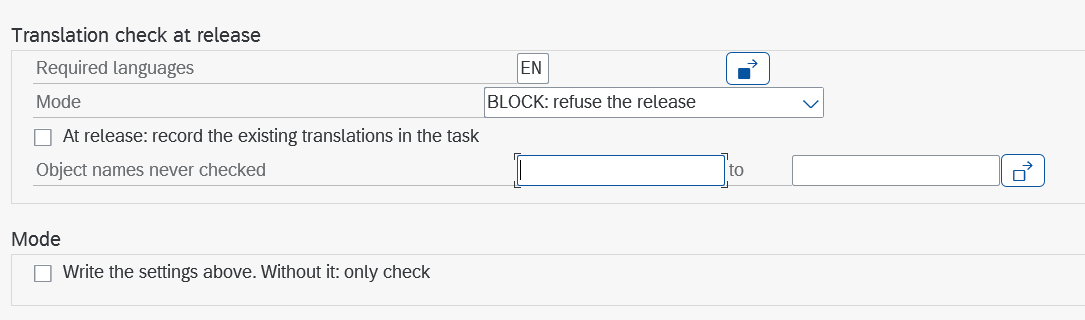
A sensible start: languages set, mode OFF, run the report over your namespace to see today's translation debt, translate it, then INFORM for a few weeks, then BLOCK.
The report on its own
You do not need the Git review to use it. Report ZTR_TRANSL_REPORT works on any system where the tools are pulled, also with the GitHub part never set up: the review check stays inactive until a GitHub App is configured, the translation check does not depend on it.
Choose what to check: one task or request, packages, or namespaces ("run all"). Tick Enter translations and name the request the translations go into.
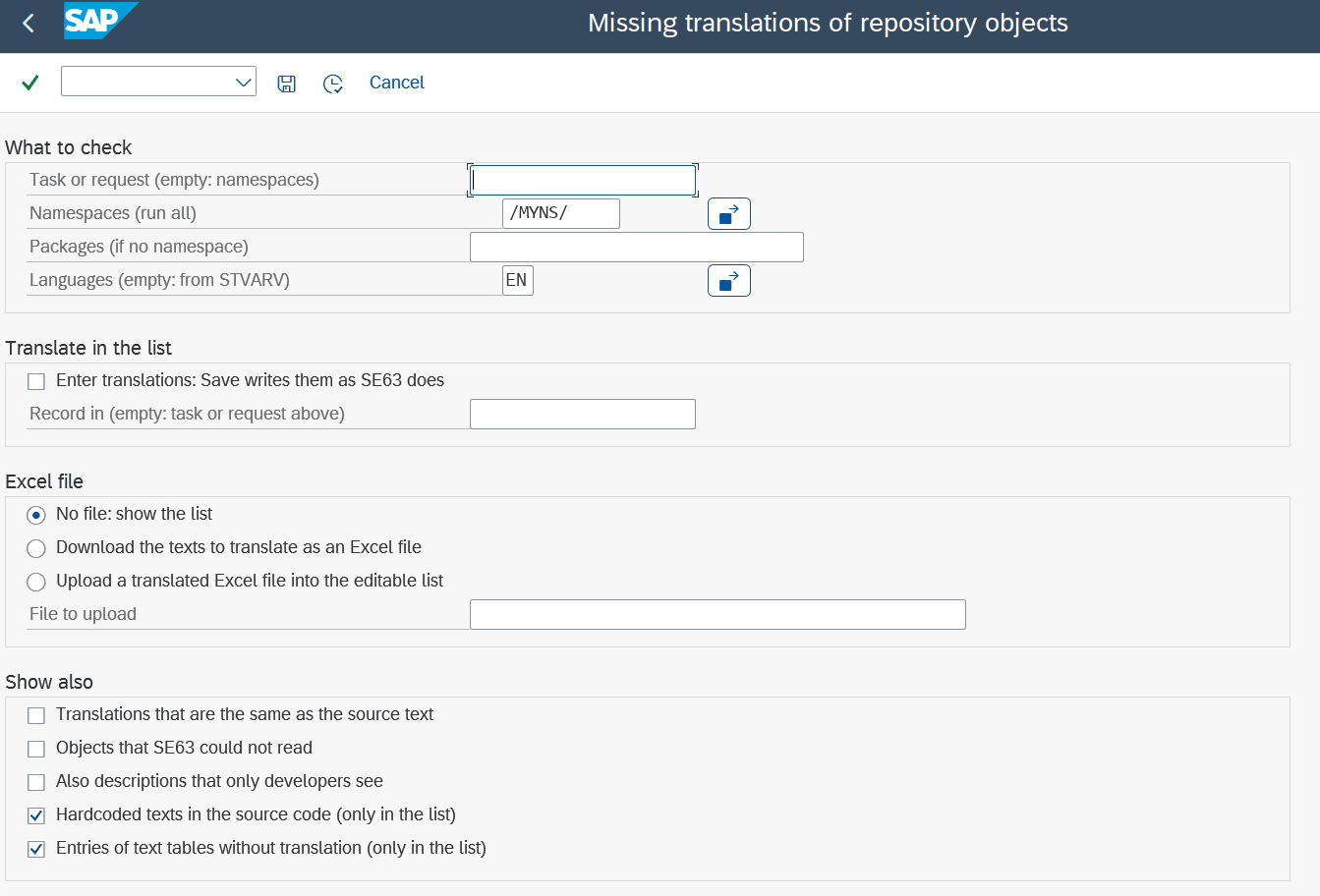
The list shows one line per missing text and language. The column Kind of text says in plain words where the text appears (a message, a selection screen label, a dropdown value, a launchpad tile), so the translator can word it for its place. Max. length is the limit SAP returns for that very text; the light turns red with "Too long by N" when the translation does not fit, and such a line is not saved.
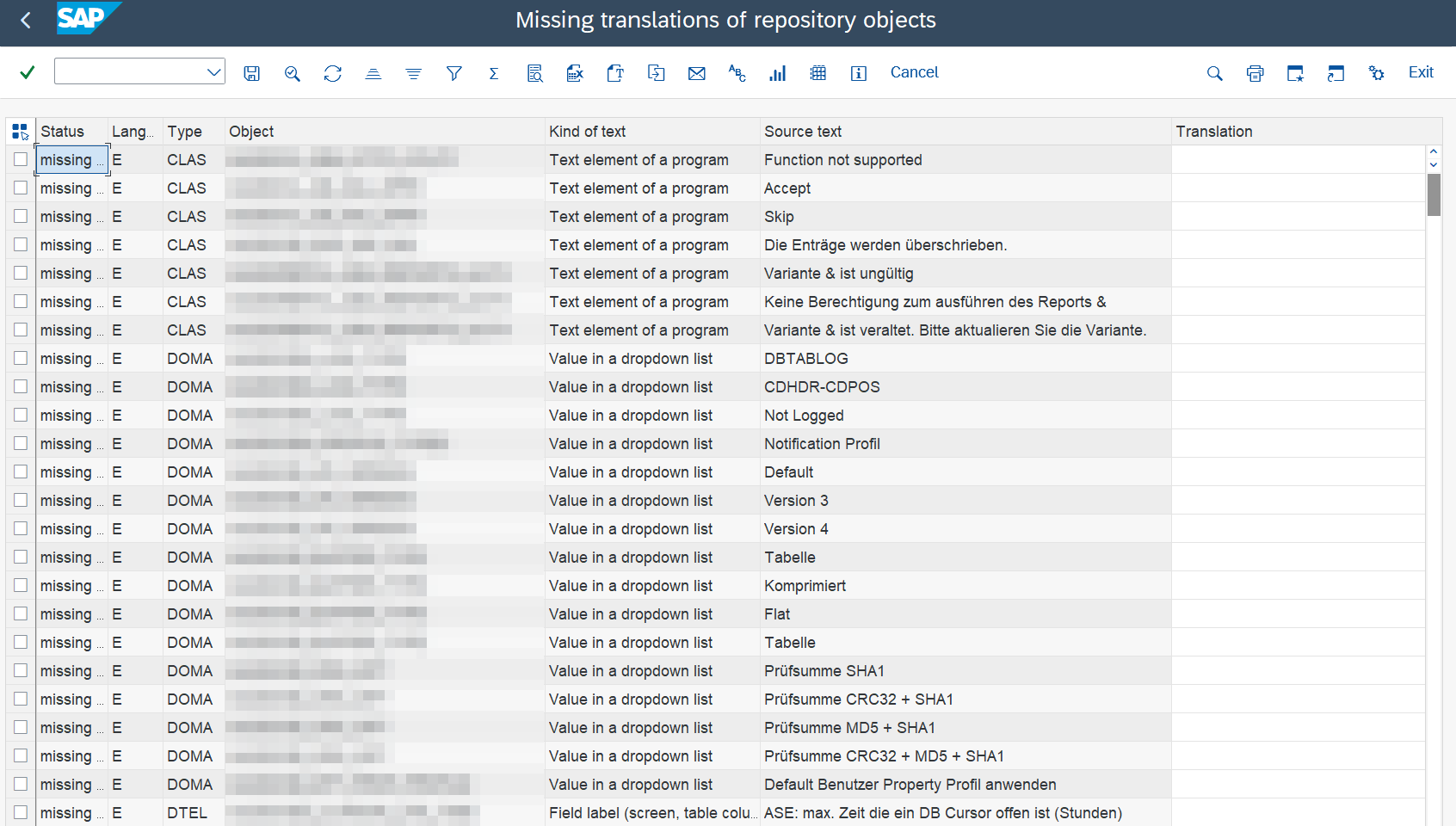
Save writes the translations with the same function modules SE63 uses, reads the transport entries of the translation (LANG entries) and appends them to the request. If no request was given, Save asks for one with the standard transport dialog; cancel writes nothing. A translation is never saved without a request.
Translating in Excel, or with AI
For many texts, a translator without SAP access, or AI: download the texts as an .xlsx file. The sheet is protected except for the column Translation; length and a red "Too long" warning are Excel formulas, and hidden columns find each text again in SAP.
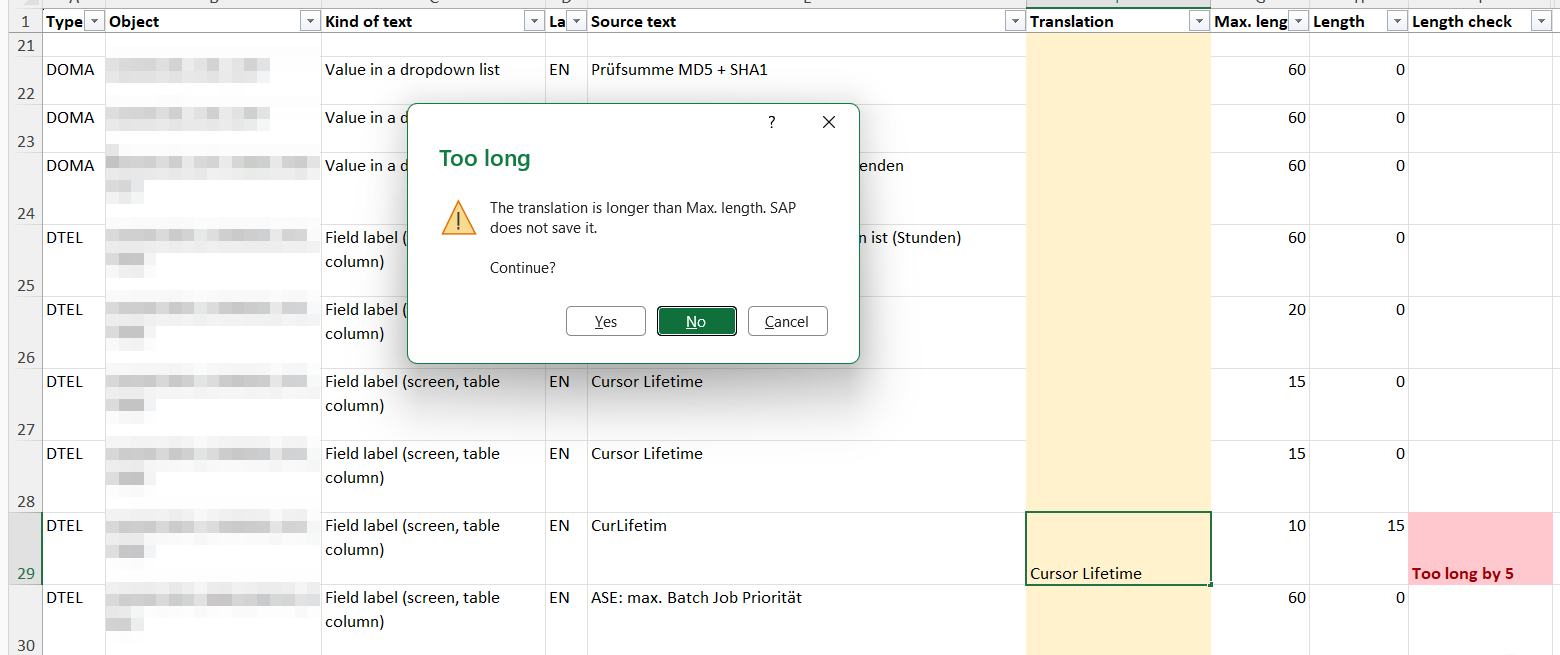
Give the file and your glossary to the translator or to an AI with a short prompt: translate into the language in column "Language", respect "Max. length", keep placeholders such as &1, use the glossary terms. Then upload the file: the report opens the editable list filled with the translations, nothing is written yet. Check the lights, correct what is needed, Save. A line whose source text changed in SAP since the download is left out, so an old file never overwrites a newer text.
At release: task, request, Translate now
The check runs as a second implementation of the BAdI CTS_REQUEST_CHECK, next to the review check, and neither knows about the other.
Releasing a task. The task is checked with its own objects, and the whole object counts: an old untranslated text of the class you touched is listed too. In SAP GUI a popup names the missing texts and offers Translate now, which opens the report for exactly this task, with "Enter translations" ticked and the task as the target. Translate, Save, go back: the check runs again and the release goes on by itself. The translations are released together with the change, so they land in the same pull request and get reviewed with it.
Releasing the request. The request is checked with all its objects. Translating here also works, but the translations then land in the request itself, after the review: the review check sees files that were not reviewed, pushes them, and refuses the release once until the pull request is approved again. That is why the rule for the team is simple: translate in the task.
From Eclipse (ADT). ADT shows no popup, and nothing at all for a release that goes on. In mode INFORM the developer therefore finds the missing texts in the pull request; in mode BLOCK ADT shows the error of the refusal, and the developer runs the report in SAP GUI.
| Mode | Missing text at release |
|---|---|
OFF |
nothing |
INFORM |
popup with "Translate now" or "Release anyway"; the release goes on |
BLOCK |
popup with "Translate now" or "Cancel release"; refused while a text is missing |
In the pull request
When the tools push a released task to GitHub, the pull request description gets a section Missing translations: object, kind of text, language and source text, at most 25 lines. It is rebuilt at every push, so it disappears once the texts are translated in a further task of the request. The reviewer sees the gap without an SAP login, and a developer who released from ADT sees it too.
Whether a translation is right is a review question, not an SAP one. The repository ships instructions for GitHub Copilot code review: the language of every text matches its language key, placeholders are kept, glossary terms are used, both languages change together. Copilot comments on the changed texts like on code.
Transports: the translation must travel
A translation made in SE63 and recorded in no request passes every check on the development system and still never reaches QA or the customer. The tools close this from three sides:
- The report always records what it saves, in the request you name.
- Recording at release (optional switch): a task that holds a program or class only as code (
LIMU REPS,METH, ...) does not carry its text elements. With the switch on, the release of the task adds the translations of their text pool asLANGentries. Objects that sit in another open request are skipped, so no text of somebody else's unfinished change is shipped early. - Deliveries are checked strictly. Transports of copies are normally not checked; one marked
#DELIVERYis.
Markers in the request text
Each tool reads only its own marker, and markers can be combined. They stay visible in the request, so every exception is documented where it happened.
| Marker | Effect |
|---|---|
#DELIVERY |
a missing translation always refuses the release, in every mode, without "Translate now": translations are made in development requests, never in a delivery |
#NOTRANSL |
emergency: released without the translation check, also with #DELIVERY |
#NOREVIEW |
emergency: released without the review check (the Git part) |
Hardcoded texts and text tables
MESSAGE 'No entries selected' TYPE 'E' cannot be translated: SE63 does not know the literal. The report lists such texts with the include and line; a double click opens the source there. Messages, WRITE output, titles, popup and ALV texts are found; names, URLs and texts with a text symbol are not.
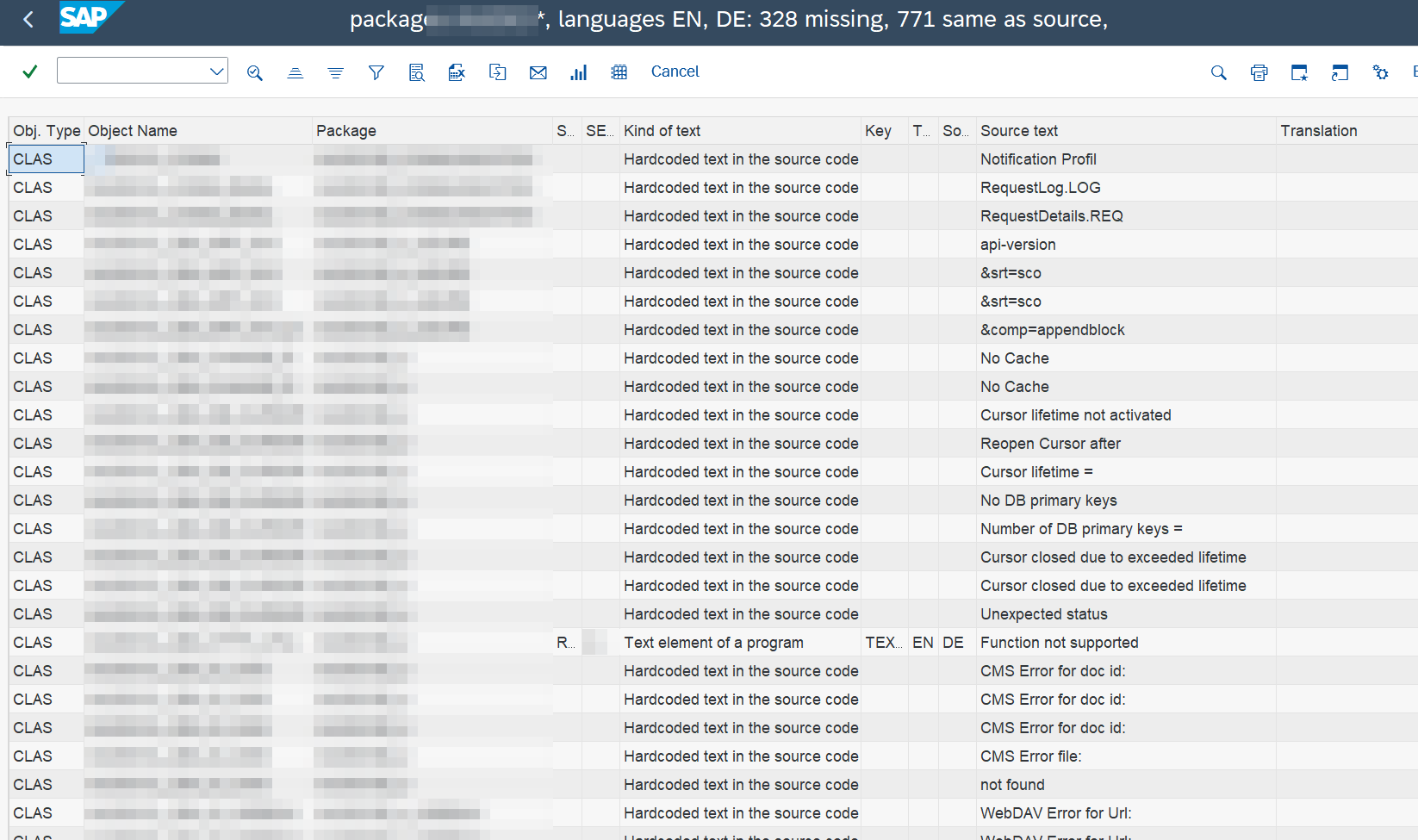
The fix is a code change: a message of the package's message class or a text symbol, and then the text is translated like any other. The guide in the repository has the rules per case and a prompt that lets an AI propose the change for each line, for a developer to review.
Tables with a language key are compared too: an entry that exists in German and not in English is listed with its key, to translate in SM30 or SE63.
Limits, honestly
- The check reads the texts on the system, not what the request carries. That is on purpose (an untranslated object is untranslated, whoever touched it last), and why recording and the
#DELIVERYcheck exist. - A run over a whole namespace reads every object through SE63 and takes minutes; schedule it in the background.
- The LXE function modules are the ones SE63 itself uses but are not released APIs. They have been stable for many releases; a change after an upgrade would show at the first run.
- Download, upload and the length lights need SAP GUI.
Get it
The code, the installation checklist and the guides (how the check works, a step-by-step guide for translators, and a guide for building transports) are on GitHub under the MIT licence: catafeidi/abap-transport-review. Pull it with abapGit into a local package, run ZTR_SETUP, and run ZTR_TRANSL_REPORT over your namespace. The first list is usually longer than anybody expected.